

As an organization that partners closely with affordable housing teams across Canada, we’ve noticed that AI still feels intimidating for many providers. Not because people aren’t open to it, but because they’re unsure where to start or how it fits into the realities of their day-to-day work. This was confirmed at BCNPHA’s Housing Central Conference when an AI session revealed how few people in the room use AI regularly. (See the screenshot below.)
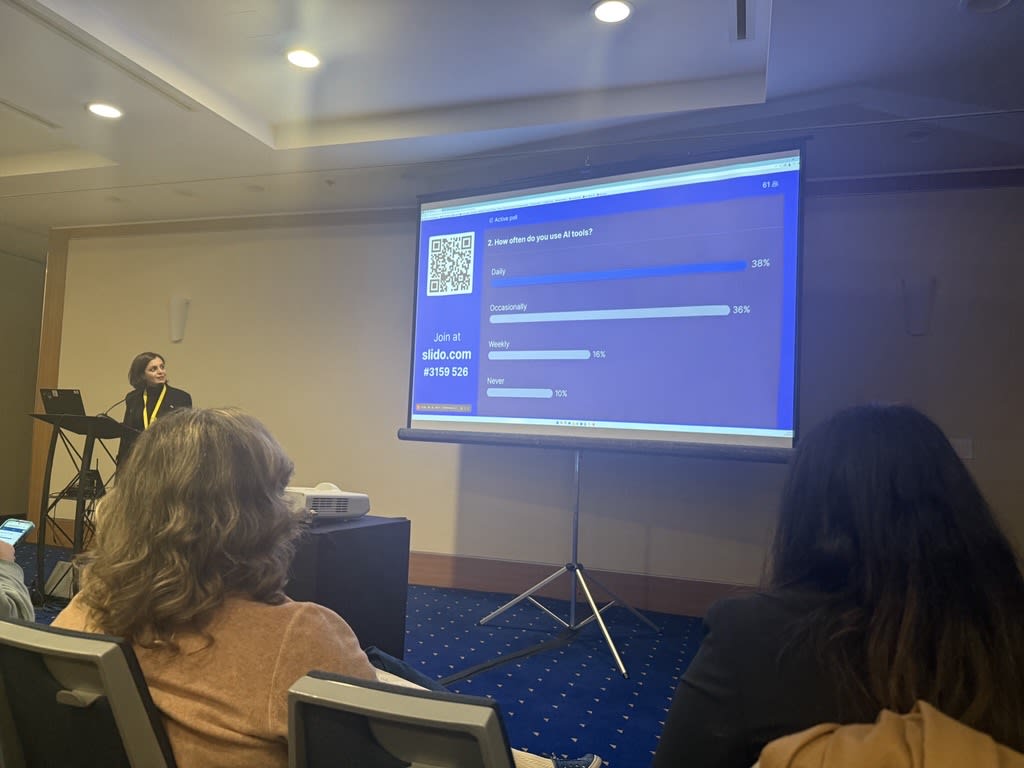
Here’s the truth: In 2026, not using AI to simplify repetitive tasks is becoming an operational liability.
It creates heavier admin loads, slower processes, overflowing inboxes, and less time for people work, which is the heart of affordable housing.
The good news is that AI does not require advanced training or expensive systems to be useful. Most organizations already have access to simple, practical tools that can remove friction from daily operations. The goal of this blog is to break those tools down in plain language, show how they apply to housing workflows, and give your team a clear starting point.
What AI Actually Is (and Why It Matters for Affordable Housing)
AI is not a new invention. It has existed since the 1950s and has quietly powered everyday tools like spam filtering, Google search, predictive text, autofill, and navigation apps.
What has changed is access. The capabilities that once lived only in engineering labs are now available to everyday users, which means housing teams can benefit from them in practical, meaningful ways.
Affordable housing organizations carry one of the heaviest operational loads in the non-profit sector. High-volume communication, compliance reporting, maintenance triage, tenant inquiries, documentation, and administrative processes can overwhelm even the strongest teams. The work is constant and often time-sensitive, which leaves very little room for the deep thinking, planning, and relationship-building that this sector depends on.
This is where today’s AI is becoming useful. It can summarize long documents, clean messy spreadsheets, generate notices, draft checklists, translate communication, and create step-by-step instructions for complex tasks. It removes friction from the work around the work, the tasks that quietly consume hours every week.
None of this replaces the empathy, judgement, or human connection that affordable housing requires. It simply supports teams by taking repetitive tasks off their plate, so they can focus on tenants, partnerships, problem-solving, and the parts of the work that actually move communities forward.
The AI Tools Housing Providers Can Start Using Today
ChatGPT
Think of ChatGPT as a digital assistant that can help staff prepare notices, rewrite tenant letters, summarize long policies, clean data, create spreadsheets, and prepare communication in a professional tone.
In 2026, ChatGPT has grown powerful enough to interpret uploaded documents, analyze data, and produce templates in seconds. It is also discounted for nonprofits, which many housing organizations qualify for.
Teams can use it to clarify communication, prepare agendas, write reminders, translate notices, simplify dense language for tenants, or draft board updates. The only caution is that AI sometimes fills in missing details on its own, so staff should always review and verify content.
Use it as your drafting assistant, not your decision-maker, and avoid putting personal or sensitive information into any AI tool.
Claude for Documents and Co-Working
Claude is useful for property teams that work with long documents, policies, reports, spreadsheets, and planning materials.
It can summarize dense information, compare documents, extract key points, analyze spreadsheets, create action plans, and turn rough ideas into practical templates. With Claude’s built-in workspace features, teams can also create simple dashboards, process maps, checklists, internal guides, spreadsheet-style trackers, and visual layouts that can be reviewed and refined as they work.
For property teams, this could mean building a maintenance escalation workflow, a resident communication checklist, an after-hours call handling guide, an inspection tracker, or a summary of recurring issues across a portfolio.
The goal is not to replace staff expertise. It is to help teams move from scattered information to a useful first draft faster.
Scribe or Tango for Process Documentation
Some of the most important knowledge on a property team lives in someone’s head: how to update a tracker, complete a report, process a request, organize a file, or follow an internal workflow.
Tools like Scribe or Tango can help turn those everyday processes into step-by-step guides. A staff member simply records their screen while completing a task, and the tool creates a process document with screenshots and written instructions. For property teams, this can be useful for documenting inspection processes, maintenance tracking steps, move-in or move-out workflows, reporting tasks, leasing follow-ups, or internal administrative procedures.
Instead of explaining the same process repeatedly, teams can build a simple library of guides that staff can return to when needed. This can support onboarding, reduce confusion, and make recurring work easier to follow.
HeyGen for Training and Communication Videos
HeyGen can help teams turn written scripts, slides, or ideas into AI-generated videos with narration, captions, visuals, and avatars. This can be useful for explaining routine information clearly, especially when the same instructions need to be shared more than once.
At Telelink, we have used HeyGen for policy announcements, Learning and Development training, and onboarding support for new account launches. Using avatars has made it easier to create these videos without requiring employees to record each one.

Canva’s AI Tools
Many providers already create posters, newsletters, tenant notices, and event flyers in Canva. With its new AI features, Canva can now refine text, recommend layouts, create multi-page designs instantly, and resize materials for print or social use in seconds.
For staff who are not designers, this saves hours while producing clear, professional communication that tenants can easily understand.
Microsoft Copilot or Google Gemini
Most housing teams already use Outlook, Word, Excel, Gmail, Docs, or Sheets. Copilot and Gemini integrate AI directly into these familiar tools.
They can summarize long email threads, extract action items from meetings, rewrite messy notes into clear documents, explain Excel formulas, clean datasets, or prepare reports automatically.
It is one of the easiest, lowest-effort ways for housing teams to benefit from AI without learning a new platform.
Otter for Meetings
If your team struggles to capture meeting notes, follow-ups, or action items, Otter records and transcribes discussions automatically. It identifies speakers, organizes topics, and produces summaries that teams can act on immediately.
For organizations juggling multiple programs, partnerships, or regulatory updates, this ensures nothing gets lost.
Staying Updated Without Overwhelm
Most people assume that staying current with AI means constant research. In reality, the tools do the work for you. Canva, ChatGPT, Copilot, etc.. typically send simple email updates that explain new features in plain language. One quick read each month keeps your team up to date and helps you maximize tools you already use.
Where AI Meets Automation: Saving Hours Every Week
AI is powerful, but the real magic happens when it can work without a human sitting in front of a screen. That’s where automation comes in.
Zapier: The Invisible Assistant That Connects All Your Tools
Zapier connects the everyday tools you already use—Gmail, Google Forms, SharePoint, Slack, Excel, Notion—and makes them talk to each other automatically.
Instead of manually moving information between forms, spreadsheets, inboxes, and databases, Zapier can handle it quietly in the background using zaps.
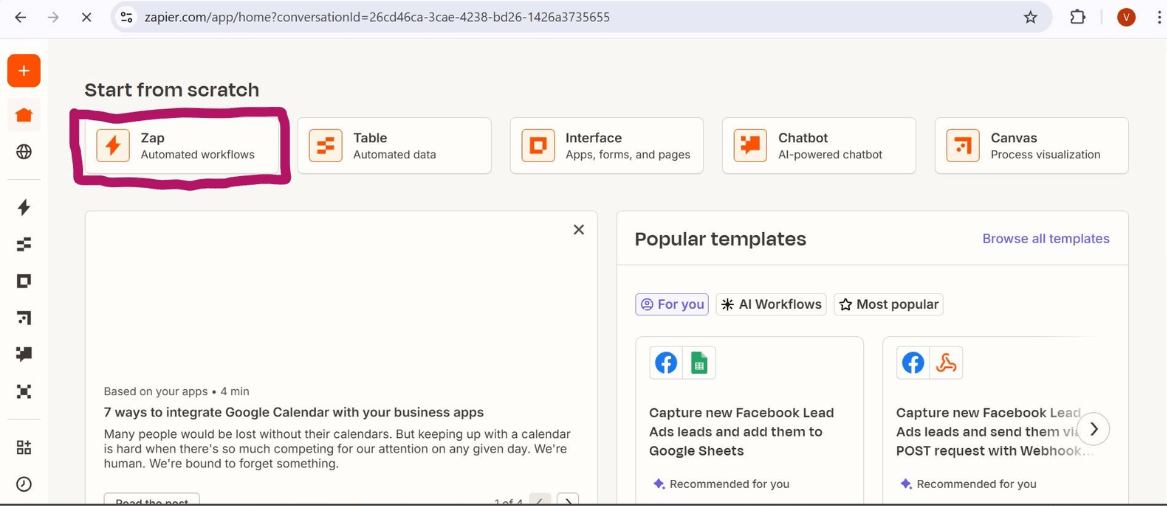
For example, when a tenant submits a maintenance form, Zapier can notify the right staff member, log the request into a spreadsheet, and send a confirmation message to the tenant, almost instantly.
This reduces missed messages, keeps communication consistent, and saves time.
Zapier works through simple logic:
If this happens, then do that.
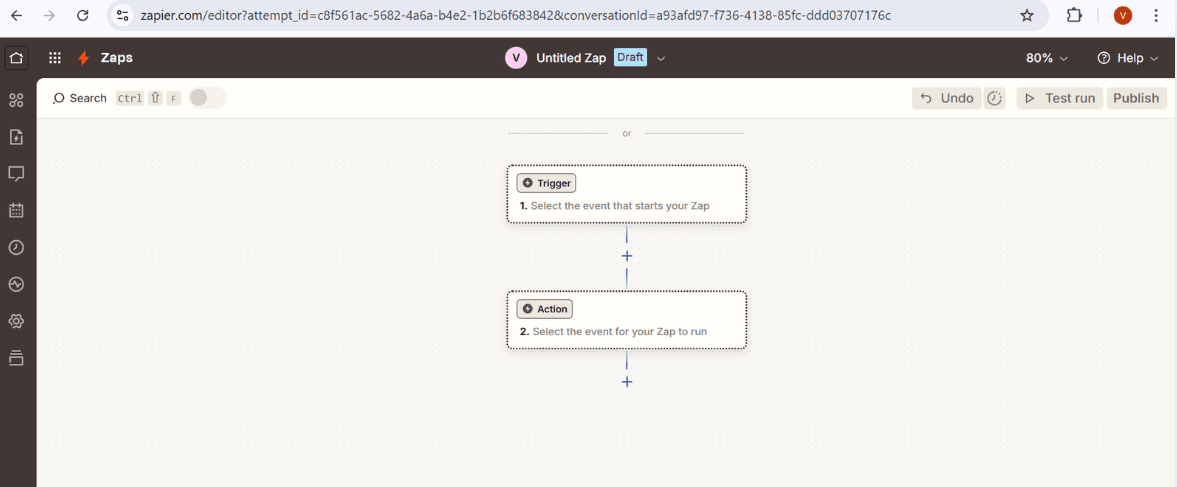
You can create automations for:
• Sending welcome emails for new program inquiries
• Notifying staff when a tenant completes a form
• Organizing documents automatically
• Adding applicants to spreadsheets without manual entry
Here's how you can create your first Zap with Zapier:
- Go to zapier.com and click Sign Up. Choose “Continue with Google” or use your email.
- Pick the apps you use. You’ll see popular ones like Gmail, Google Sheets, Google Form, etc.
- Create your first Zap
Click “+ Create Zap.”
Choose a Trigger App e.g., Google Forms.
Choose the Trigger Event e.g., “New Form Response.”
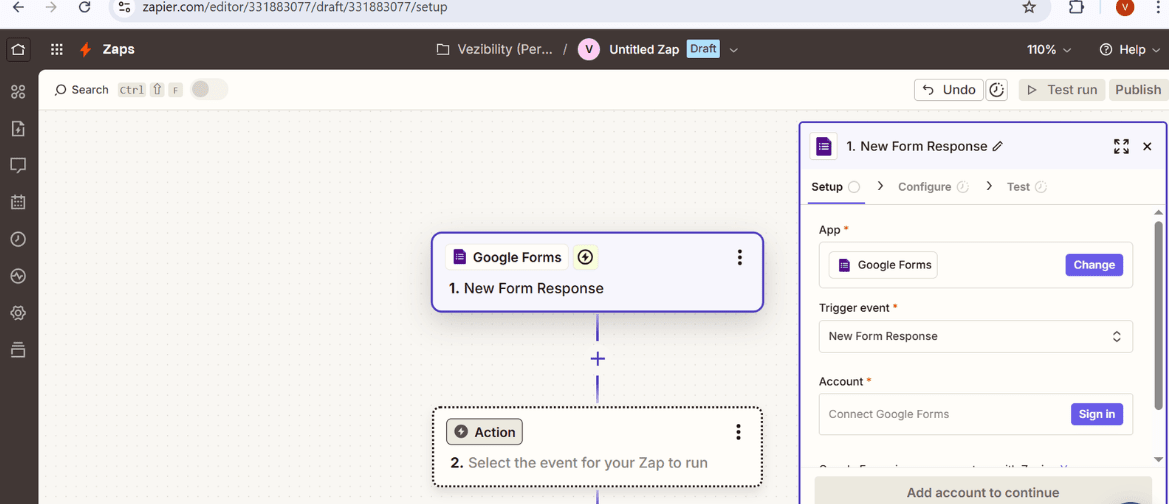
Then choose your Action App — e.g., Gmail.
Pick your Action Event e.g., “Reply to Email.”
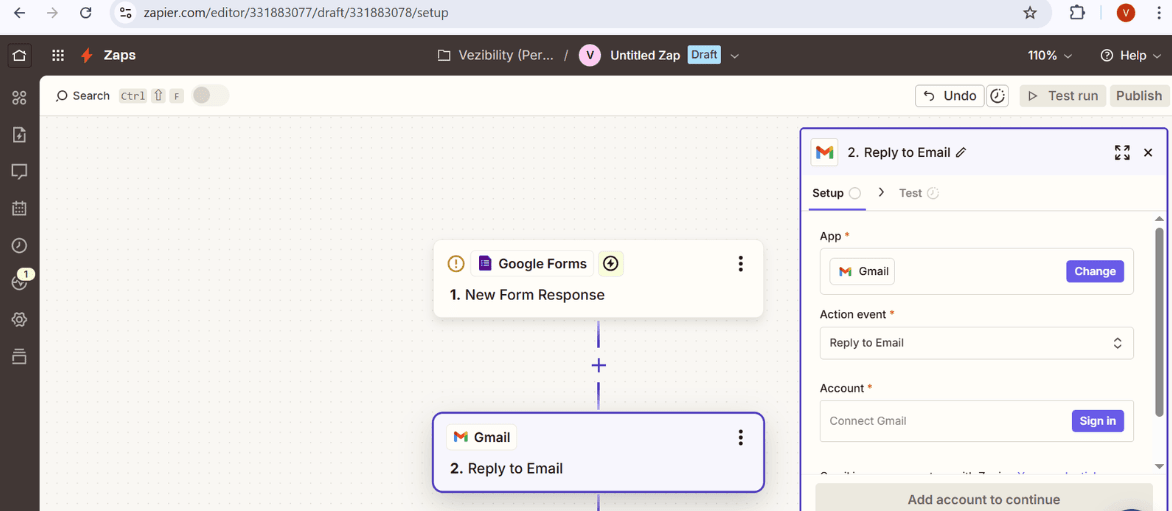
4. Complete the process, save, and test. Zapier will show you if everything’s working properly.
And just like that, your first automation is live.
Even the free plan allows up to five automations, which is enough to transform repetitive workflows.
Zapier gives teams consistency, organization, and time back: ideal for housing providers managing multiple properties, high call volumes, or complex reporting requirements.
Where Telelink Comes In
The goal of AI is to free up capacity so teams can focus on what matters. And when tenant communication becomes the next biggest weight on your workflow, that’s where a partner like Telelink can help carry the load. AI handles the admin; we help you stay responsive.
About Telelink
Telelink is Canada’s leading answering service partner for Affordable Housing Providers who value resident relationships. Our specialized Property Management division understands the unique needs of housing teams, from maintenance triage to after-hours communication and everything in between.
Our scripting process is built around industry best practices and tailored to your workflow. Every script is designed to separate urgent from non-urgent calls while capturing every critical detail and minimizing internal follow-ups. The result is less stress for staff and a smoother experience for tenants.
Want to see how housing providers are streamlining maintenance and improving tenant satisfaction? Check out one of our Property Management case studies or download our Maximizing Maintenance Workflows guide.
Inside the guide, you’ll find real examples, a simple triage checklist, and practical strategies to reduce after-hours stress, protect your assets, and keep tenants happy while controlling costs.
Please note: Telelink is not a property management company. Telelink is a 24/7 call centre that specializes in servicing the property management industry. The opinions expressed in this article reflect our experience working with hundreds of property management and affordable housing organizations across Canada, conversations with industry subject matter experts, and our own informed perspectives built over 60 years in the industry. This content is not intended as regulatory or compliance guidance.